

























Best Online Calendar Printing Services For 2027
Every online printer will tell you they’re the best choice for your calendar. Comparing them usually means a few different quotes, a few different turnaround promises, and honestly, not an easy way to tell which one will actually deliver the quality you need. Once you get into product specifics like paper, binding, and finish, it gets even harder to compare apples to apples.
Here’s a direct comparison of calendar printers with focus on price, turnaround, proofing, and customization, including where PrintingCenterUSA stands out as a U.S.-based option for trusted, reliable, high-quality calendar runs.
Key takeaways:
- To compare calendars, think about turnaround time, proofing, quality, and price.
- Setup fees and shipping can change your total more than the per-unit price does, so get the full quote before comparing.
- Proofing and color accuracy are where cheap calendar printers usually cut corners.
- PrintingCenterUSA offers 3-4 business day turnaround after proof approval, three free PDF proofs with the option of a paid hardcopy proof, and multiple pricing options for both short-run and bulk calendar orders.
Overview of Calendar Printing in 2026
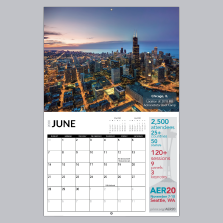
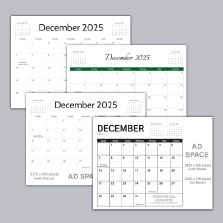
Calendar printing covers a lot of ground these days. You’ve got wall calendars, desk calendars, photo calendars, and each one really just depends on where it’s going to end up, whether that’s hanging in an office, desk, or given away for someone else to decide. PrintingCenterUSA specializes in photo wall and desk calendars, like spiral or wire-o bound.
How it gets printed matters just as much as the format itself. Digital printing keeps smaller orders like 25 or 50 copies affordable without a huge price jump. Offset takes over once you’re printing in bulk, and that’s where the cost per unit really starts dropping.
Buyers in 2026 want more than just a basic calendar. Eco-friendly paper and QR codes are becoming pretty standard now instead of some extra add-on.
Latest formats and styles
The format someone picks usually comes down to where the calendar’s going to live.
- Large wall calendars for offices, garages, anywhere your calendar can double up as wall art
- Spiral-bound desk calendars with full-bleed photos
- Mini flip calendars and magnetic strip calendars for point-of-sale counters and real estate content for fridges.
- Perpetual planners with custom date blocks. With no year shown, it can be used year after year
If you’re ordering for a giveaway, the wall calendar wins almost every time due to the low cost, high visibility, and how easy it is to hand out.
Finishing options for calendars
The finish is where a calendar goes from fine to genuinely nice. It’s also where cost can slowly build up so it’s worth knowing what each option actually does.
- Gloss or aqueous coating: the standard pick for anything meant to be resold or gifted, since that light sheen makes colors pop
- Matte laminate: No sheen, photographs well and doesn’t show fingerprints.
- UV spot coating: used selectively, usually just on a logo or headline, so it pops against a background without coating the whole page
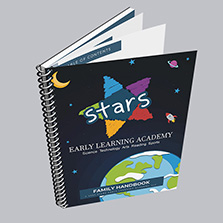
- Wire-o/coil binding, lets calendars lay flat and lets wall calendars flip cleanly page to page instead of fighting the spine
Hole drilling’s a separate add-on from binding, by the way. If a calendar needs to hang on a nail, confirm the printer actually offers it. Not all of them do by default.
Customization features
Most printers will say “custom calendars,” but that default applies to the fact that you can upload your photos and make it your own. The real differentiator is the add-on customization options to make it your own.
- Variable data printing: names, dates, or messages that change copy to copy, common for donor or client gifts for non-profits
- Custom cover and back pages with multiple image layouts for photos
- Add-ons like fold-out pages, stickers, or die-cut shapes
- Multi-language date blocks and holiday lists for calendars going to international offices or bilingual audiences
Variable data minimums vary a lot vendor to vendor. If that’s part of the plan, confirm it before you finalize files, not after. Variable data options are not something PrintingCenterUSA offers.
Comparative analysis of leading online calendar printers
This comparison uses real, published pricing at the same spec across every vendor: a 12-month wall calendar, 11″ x 8.5″, 28 pages, 100 lb gloss cover and text, at 100 units. Getting everyone on the same spec is the only way this comparison actually means anything.
| Printer | Total price (100 qty) | Unit price | Notes |
|---|---|---|---|
| PrintingCenterUSA | $658.48 | $5.27 | Built for both short-run and bulk business orders |
| Greener Printer | $618.44 | $6.18 | Lowest total in this comparison |
| US Press | $630.63 | $6.31 | with gloss uv is default |
| Smartpress | $999.99 | $10.00 | |
| GotPrint | $814.61 | $8.15 | Includes hole drilling, a $14 add-on most vendors charge separately |
| Vistaprint | $2,350.23 | $23.50 | Spiral-bound, limited paper options, built for personal/family orders rather than business bulk runs |
Vistaprint’s pricing reflects a consumer product, not a business bulk order, which is why it’s so far outside the range of the rest of this table. For a 100-unit business run, Greener Printer, US Press, and PrintingCenterUSA land closest together, with Smartpress and GotPrint running noticeably higher.
Pricing overview
Calendar pricing comes down to five things: paper, binding, finishing, setup, and shipping. Get those five dialed in and the quote makes sense. Skip past them and the final number always feels like a surprise.
For a 100-unit wall calendar order, expect somewhere around [PLACEHOLDER: total cost range], depending on paper stock and lamination. Volume discounts typically kick in around 250 to 500 units, and that’s where per-unit price really starts to drop.
Bulk economics matter most once you’re ordering for a full client list, donor base, or company-wide distribution. Running one large order instead of two smaller ones almost always wins out on cost per unit.
Turnaround times and shipping options
Turnaround depends on the job, not just the vendor. A simple flat wall calendar moves faster than a 32-page spiral-bound one with variable data.
Typical ranges across the industry:
- Standard digital print jobs: 3 to 10 business days
- Offset or heavy finishing work: 7 to 14 business days
- Expedited options: 1 to 2 business days for an added fee
Shipping runs through the major carriers with tracking included for most online printers, which matters most if you’re ordering close to a deadline.
Reviewing proof services
A proof is the last checkpoint before a mistake becomes a printed, paid-for mistake. Not every printer handles it the same way.
What to look for:
- High-resolution PDF proofs with real color profiles, not just a flattened screenshot
- The option to request a physical proof for anything color-critical
- A clear way to leave notes and request revisions without starting completely over
A hardcopy proof usually costs extra on top of whatever digital proofing a vendor includes by default. For color-critical jobs, that add-on’s worth paying for.
Why PrintingCenterUSA stands out
PrintingCenterUSA’s been printing calendars, books, and marketing materials in the US for [PLACEHOLDER: 50+ years — confirm]. That’s long enough to have seen most of what can go wrong with a calendar order, and to have built a process around avoiding it.
We work with nonprofits, retailers, and corporate buyers who need calendars to show up correctly and on time, year after year, without a learning curve every time they reorder. Turnaround runs 3-4 business days after proof approval, and every order includes three free PDF proofs, with a paid hardcopy proof available if you want to check color in hand before the full run prints.
Quality of materials and print
PrintingCenterUSA sources both coated and uncoated stocks, with gloss, matte, and silk finish options. Binding runs the range from wire-o and saddle stitch to perfect binding, for anything with enough pages to need it.
One thing worth knowing upfront: PrintingCenterUSA prints on white paper only. No gold foil, no colored stock as a base. If a calendar design depends on a colored paper base, that’s worth flagging before files go to production.
Speed of service
Turnaround starts counting once a proof’s approved, not when the order first comes in, so a fast proof turnaround on your end speeds up the whole timeline. Rush pricing shows up clearly at checkout instead of getting buried in an email later.
If you’re ordering close to a fiscal year start or a holiday distribution date, that predictability matters more than shaving off a day or two.
User-friendly ordering experience
The order flow at printingcenterusa.com walks through paper, binding, finish, and shipping in one pass, with pricing that updates as choices change instead of waiting until checkout to reveal the total.
Customer service is reachable by phone at [PLACEHOLDER: 800-995-1555] and by chat, with production staff available to check files before they go to proof. That file check catches the kind of small errors, like a low-resolution photo or a missing bleed, that would otherwise show up as a problem in the printed run.
Practical buying guide: evaluating calendar printing providers
A calendar order is a small project with a lot of ways to go sideways. A short list up front saves a lot of back-and-forth later.
Priority items to check before ordering:
- Total landed cost, including shipping and any setup fees
- Minimum order quantity and where bulk discounts start
- What proofing actually looks like, digital or physical
- Realistic production and shipping timelines, not just the best-case number
- How support handles a mistake, since something always comes up eventually
Requesting a sample pack before a big order is worth the extra few days. It’s really the only way to feel the paper stock before committing to 500 units of it.
Understanding file preparation
Most calendar problems start in the file, not on the press. Export a high-resolution PDF with crop marks and bleed built in. Set images to 300 dpi. Embed fonts or convert them to outlines so nothing shifts on someone else’s machine.
For multi-page calendars, page order matters more than people expect. A file uploaded out of sequence means January ends up next to July, and that’s not the kind of thing anyone catches until the proof.
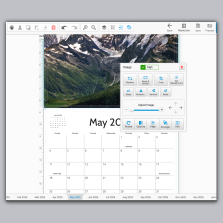
PrintingCenterUSA provides downloadable templates and runs a file check before production to catch layout errors early.
Importance of color accuracy
Color’s where a calendar either looks intentional or looks off. If a brand color needs to match exactly, a Pantone reference is worth including with the file. A calibrated monitor helps too, since screen color and printed color don’t always agree.
For anything brand-critical, a physical proof’s the only real way to know for sure before the full run prints.
Navigating customer support
The fastest way to test a printer’s support before committing to a big order is to ask a real technical question and see how long it takes to get an actual answer. Good support catches preflight issues before they become production issues, and explains tradeoffs honestly instead of just upselling the fastest turnaround.
PrintingCenterUSA’s production advisors review files directly and flag cost-saving alternatives when they see one, without cutting corners on the final print.
Production specifics: What to expect
Calendar production has three real stages, and each one’s got its own timeline.
- Prepress and proof approval: 1-3 business days
- Standard production: 3-7 business days
- Finishing and packing: 1-2 business days
Add it up and a standard order runs 5 to 12 business days start to finish. Expedited service shortens that window for an added cost. PrintingCenterUSA flags seasonal peaks, like the fall rush before calendar season, that can stretch these estimates.
Getting your calendar printed: Steps to order
Placing your order
- Choose format, paper, binding, and finish
- Upload files using the printer’s template and review any preflight feedback
- Select a shipping method and confirm delivery timing
PrintingCenterUSA’s checkout shows final pricing and estimated production dates before anything gets charged, so there’s no guessing at the total.
Validating your proofs
- Review the PDF proof for layout, crop marks, and typos
- Request a physical color proof if the job’s brand-critical
- Approve or request one round of revisions, then sign off
Double-check imagery, spelling, and dates before final approval. A reprint costs more than the extra five minutes of checking ever will.
Conclusion and next steps
Picking a calendar printer in 2026 comes down to matching format and finish to what the calendar actually needs to do, then checking that the proofing and turnaround match your timeline. PrintingCenterUSA holds up well on all three, with competitive pricing for both short runs and bulk orders, and US-based production that keeps timelines predictable.
Next step: pull together your images, download a template, and run a test order of 25 to 100 units before committing to a bigger run.
Frequently asked questions about calendar printing
How much does custom calendar printing cost? Cost depends on size, paper, binding, and finish. At PrintingCenterUSA, short-run calendars typically fall between [PLACEHOLDER: $X.XX and $X.XX per unit], with bulk orders dropping below [PLACEHOLDER: $X.XX per unit]. Use PrintingCenterUSA’s instant quoting tool for pricing matched to your exact spec.
What file format should I submit for calendars? Submit a high-resolution PDF with 300 dpi images, CMYK colors, embedded fonts, and 0.125 inch bleed. PrintingCenterUSA provides downloadable templates to keep margins and trim correct from the start.
Do I need a physical proof? Physical proofs make the most sense for photography-heavy or brand-critical calendars. A digital proof’s usually enough for layout and copy checks. PrintingCenterUSA offers a hardcopy proof add-on for [PLACEHOLDER: $XX] when color accuracy’s non-negotiable.
Can I print calendars with variable data? Yes. Variable data printing lets you personalize names, dates, or messages across a run. Minimums and pricing depend on the complexity of the data, so it’s worth confirming with PrintingCenterUSA before finalizing files.
Why choose a US-based printer like PrintingCenterUSA? A US-based printer means faster shipping to domestic addresses and a support team in the same time zone as the order. PrintingCenterUSA backs that up with [PLACEHOLDER: turnaround claim] and templates built to make approval and production move faster.